


Biblia Reina Valera Cristiana
4.910.58K Reviews
App Specs
- Version
- V2.3.199
- Updated On
- License
- Free
- Downloads
- 10,000,000+
- Developer
- la biblia
- Categories
- Books & Reference
- Platform
- Android
Screenshots


 Analysis by AppCompare
My first advice to a new user is to decide what you want from a Bible app before tapping around: a quiet reading habit, a quick way to locate a passage, or Scripture to listen to while doing something else. Biblia Reina Valera Cristiana is a free Books & Reference app from la biblia, built around the Reina Valera text in Spanish. Its focus is practical access rather than a guided course, so the best first session is a small one: open a book, read a short passage, and see whether the language and reading style suit you.
Getting from installation to a useful first session
I’d use the first session to test one small, repeatable routine rather than exploring every option at once: open a passage you know, read a few verses, and save one you may want to revisit. That gives you a practical sense of whether the Spanish text and navigation work for you, while keeping the next step—building a reading habit—manageable.
What to expect from a Spanish Bible app
The main appeal here is having a Spanish-language Bible available in a mobile format, including offline reading and audio. That combination is useful if you want to keep the text close without depending on a connection every time you open it. It is also a different proposition from a general reading app: the books and chapters are the central way into the content, rather than a library of unrelated titles or a stream of recommendations.
The app is free to download and is rated for Everyone. It has an average rating of 4.8 from around 297,000 ratings, with more than 10 million installs. Those figures suggest that many people have found it useful, but they do not tell me whether its Spanish wording or its reading style will fit your needs. If you already use a particular Bible translation for church or study, check that the Reina Valera text is the one you want before making this your main reference.
A calm first setup
When you first open up the app, you’re greeted with a clean and straightforward interface. The design is minimalistic, which helps you focus on the text itself without any unnecessary distractions. Navigation is intuitive, allowing you to easily jump between books, chapters, and verses with just a few taps.
I’d keep the first setup simple rather than trying to personalize everything at once. Find a familiar passage and read a few verses first; that gives you a quick sense of the text size, navigation, and whether the layout feels comfortable on your device. Then adjust the display to suit your eyes and, if you plan to read away from home, make sure the offline content is available before you leave a reliable connection. That small check is more reassuring than discovering on a train or during a trip that you have not prepared for offline use.
The app is currently at version V2.3.199 and requires Android 7.0 or later. If you are installing it on an older phone, check the operating-system requirement before expecting it to run. There are in-app purchases priced from $0.49 to $29.99 per item, so I would treat the free download as a way to try the core reading experience and review any purchase prompt carefully rather than assuming every extra is included.
Worth Reading Before You Choose

Flipboard Shows What News Apps Must Do Beyond the Feed

Switching to Android Auto Means Rethinking Your Driving Routine

Google Calendar Makes a Crowded Week Easier to Manage

Ludo King Makes the Most of the Minutes Between Plans

Baby Panda World Brings Quick Play to Modern Phones, but Its Game Library Feels Busy

ESPN’s Live Game View Makes Following Close Games Easier
Your first meaningful action: find and keep a passage
One of the app's standout features is its offline access. Once you've downloaded the content, you can read the Bible without needing an internet connection. This is a lifesaver for those who like to read during their morning commute or when traveling off the grid.
Another handy feature is the search functionality. Whether you're looking for a specific verse or a keyword, the search tool is both fast and accurate, allowing you to find what you need in seconds. This is perfect for anyone who uses the Bible for study or teaching purposes.
A useful way to test those tools is to search for a verse you already know, open it, and then save it as a bookmark. That simple sequence shows whether the app’s search results are easy for you to interpret and gives you a reliable route back to the passage later. For a less familiar topic, search can also be a starting point, but I would read the surrounding verses rather than treating a single result as a complete answer. A keyword match helps locate text; it does not replace context.
The app also includes a bookmark feature, so you can easily mark important passages and come back to them later. For those who like to take notes, the app allows you to jot down thoughts or reflections right alongside the text.
For a practical daily routine, I’d save only passages I genuinely expect to revisit. A short, intentional bookmark list is easier to use than marking every interesting line and later having to hunt through a crowded collection. Notes can help you remember why a passage mattered to you, especially if you are reading in brief sessions, though I would keep particularly important study notes somewhere else too if you need them organized across projects or devices.
Making reading and listening fit your day
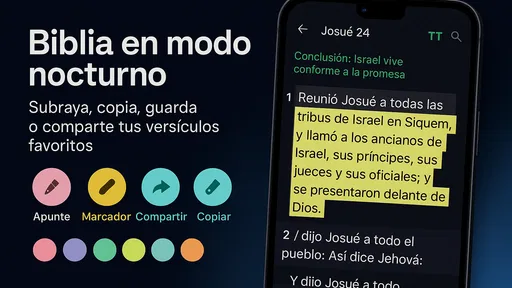
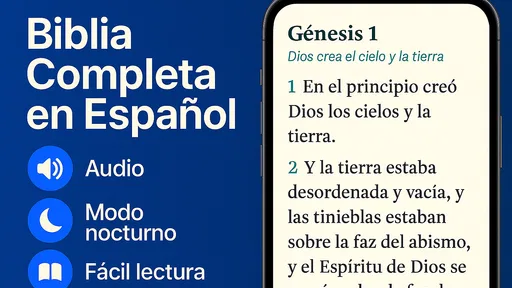
Reading on the Biblia Reina Valera Cristiana app is a pleasant experience. You can adjust the font size to suit your preference, which is a great plus for those who might struggle with small text. The app also offers a night mode, which reduces eye strain when reading in low light conditions.
For those who enjoy listening to the scriptures, the app includes an audio feature. This allows you to listen to the Bible being read aloud, which can be a comforting and enriching experience, especially if you enjoy listening while doing other tasks.
Reading and listening solve different problems, so I would not treat audio as a substitute for every kind of study. It is handy when your hands and eyes are occupied, such as during a walk or while doing a simple household task, but it is harder to pause and compare passages while moving around. For close reading, I prefer the screen because I can stop at a verse, reread it, and add a thought. For a first listen, choosing a short section and following along on screen can make it easier to keep your place.
If you are planning a quiet daily habit, pair a brief reading with one saved passage rather than setting an ambitious target you may not keep. On a busy morning, for example, you could open the app before leaving home, read a few verses, and bookmark one you want to revisit at lunch. If you expect to be offline, prepare the content beforehand; if you are relying on audio, check that the listening experience suits your surroundings and routine. These small choices make the app more useful without turning reading into another complicated task.
Common points of confusion and useful limits
The app provides options to connect with a community of believers. You can share verses through social media or messaging apps, making it easy to discuss and explore passages with friends or study groups.
Sharing a verse is most useful when you include enough context for the person receiving it to understand why you sent it. I would use the sharing option as a prompt for conversation, not as a shortcut for a careful discussion of interpretation. Likewise, a bookmark and a note are personal reading aids; they do not automatically make the app a full study workspace with every reference or research tool someone might expect from a specialist resource.
Customization is another strong point. You can tailor the app to fit your personal style, with options to change themes and highlight verses in different colors. This personalization helps make the app feel like your own digital Bible companion.
One small trade-off with customization is that more colors and saved passages can make a screen feel busy if you use every option at once. I’d choose a simple theme and reserve highlights for a few recurring purposes, such as a question to revisit or a passage that matters to a study group. That makes the visual cues useful instead of decorative noise. If you prefer a printed Bible, a larger display, or a layout built for comparing several translations side by side, a phone app may feel cramped regardless of its settings.
Compared with a paper Bible, this app is easier to carry, search, and use without a connection once the content is available, while paper avoids screen notifications and battery concerns. Compared with a broad digital Bible library, its Reina Valera focus is an advantage if that is the text you want, but a disadvantage if you need several translations or more extensive study references in one place. I would choose based on the task: quick access and Spanish reading favor this app; cross-translation research may call for a more specialized alternative.
Who will get the most from it
Overall, the Biblia Reina Valera Cristiana app is a solid choice for anyone looking to keep the Bible close at hand. Its range of features, ease of use, and thoughtful design make it a valuable tool for personal study and reflection.
I think it suits Spanish-speaking readers who want a portable Reina Valera Bible, people who value offline access, and newcomers who would rather start with a straightforward text than a complicated study interface. It can also work well for a reading group that shares passages and discusses them elsewhere. The app is less suitable if you need a different translation, advanced comparative tools, or a distraction-free experience that only paper can provide. Those are not reasons to dismiss it; they are reasons to choose the tool that matches the reading you actually do.
Whether you're a seasoned scholar or someone exploring the Bible for the first time, this app provides a comprehensive and accessible way to engage with the sacred texts. It's definitely worth downloading and exploring for yourself.
My overall recommendation is to begin with one short passage, try the search and bookmark workflow, and then decide whether the Spanish text and display feel right for your routine. With a 4.8 average and a large established audience, it is clearly a popular option, but your best test is still whether it helps you return to reading comfortably. If that first session feels natural, set up offline access for the places you read most and keep your saved passages selective. That is the point where this app becomes more than something installed on your phone: it becomes a simple, practical way to make room for Scripture in an ordinary day.
Pros
- User-friendly interface enhances readability.
- Includes daily devotionals for inspiration.
- Offline access to scripture anytime.
- Customizable font sizes for easy reading.
- Audio Bible feature for hands-free use.
Cons
- Limited translation options available.
- Audio version lacks voice variety.
- No interactive study tools included.
- Occasional app crashes reported.
- In-app ads can be distracting.
FAQs for Biblia Reina Valera Cristiana
What features does the Biblia Reina Valera Cristiana app offer?
The Biblia Reina Valera Cristiana app provides a comprehensive set of features including easy navigation through books and chapters, a search function for finding specific verses, daily devotionals, and customizable reading plans. It also offers offline access, allowing users to read the Bible without an internet connection.
Is the Biblia Reina Valera Cristiana app free to use?
Yes, the Biblia Reina Valera Cristiana app is free to download and use. However, it may offer in-app purchases for additional features or ad-free experiences. Users can enjoy the core functionalities at no cost, but should be aware of potential optional purchases.
Can I customize the reading experience in the Biblia Reina Valera Cristiana app?
Absolutely! The app allows users to customize their reading experience with options to adjust text size, font style, and background color. This ensures a comfortable reading experience tailored to individual preferences, whether you're reading during the day or at night.
Is there an option to share verses from the Biblia Reina Valera Cristiana app?
Yes, the app includes a feature that allows users to share verses via social media, email, or messaging apps. This makes it easy to share inspirational passages with friends and family, fostering community and conversation around the Bible's teachings.
Does the Biblia Reina Valera Cristiana app require an internet connection?
The app is designed to be functional both online and offline. While certain features like daily devotionals may require an internet connection, users can read and search the Bible without one, making it convenient for use anywhere, anytime.


